Enter the job
Add components directly in the Gadget or load a production job from JD Cabinet Studio.

FOR VCARVE PRO ON WINDOWS
Build cabinets and doors, check the fit on your sheets, and prepare toolpaths inside VCarve with the JD Cabinet Studio Gadget.
The installed Gadget runs in VCarve Pro 12.5 on Windows.
Change a size to see what the Gadget calculates.
Loading the sample preview…
Estimates use sample shop rates. Production files are available in the licensed Gadget.
INSIDE THE GADGET
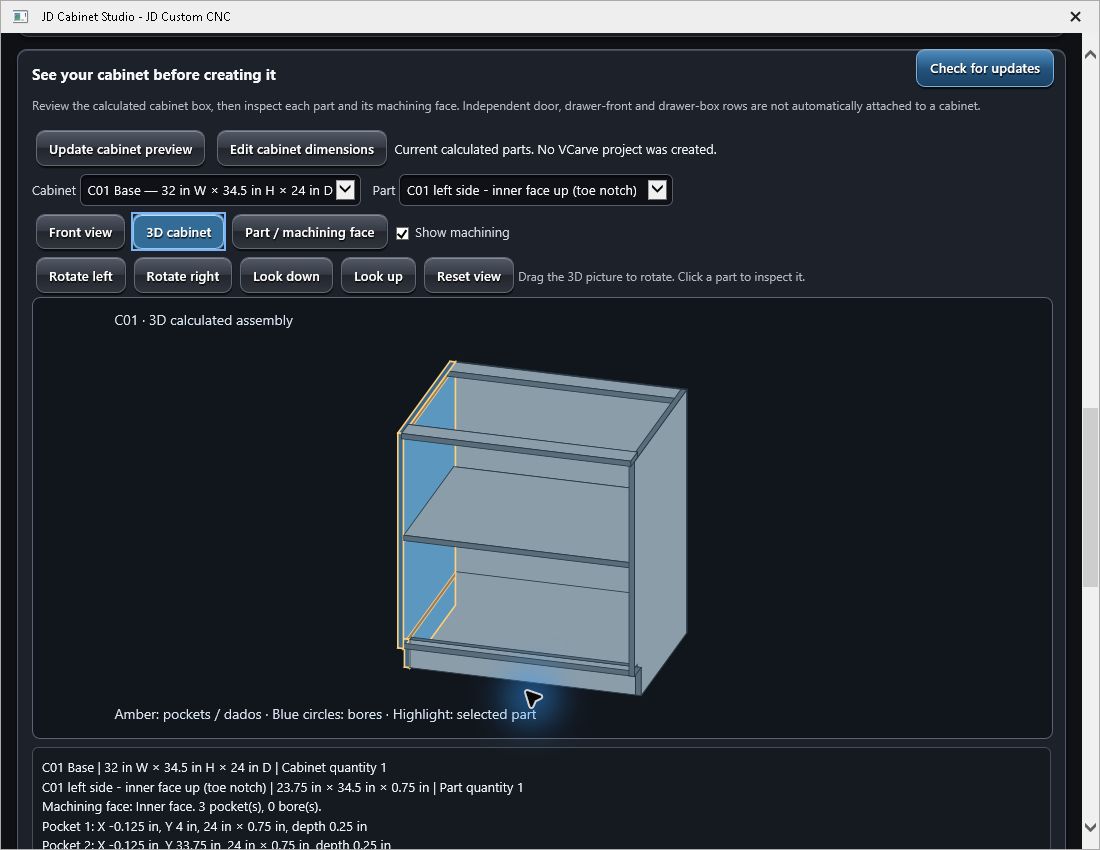
Rotate the cabinet, pick a panel, and inspect its dimensions, dados, and holes before the job gets to the router.
IN THE SHOP
Add components directly in the Gadget or load a production job from JD Cabinet Studio.
Inspect the parts and nest by material and thickness. Use DXF Layers to inspect drawing geometry already open in VCarve.
Create paths for supported operations, including rear hinge cups on supported door jobs. Review every sheet and machining side in VCarve.
PLANS
Build parts directly in VCarve with the Gadget, or add Studio to lay out the whole kitchen and prepare the estimate and installer drawings.
For shops that already have a design workflow.
$25/ month
For shops that design, quote, and cut the whole job.
$39/ month
Proposed launch pricing. Paid downloads will open when checkout goes live.
INSTALLATION AND ACTIVATION
After payment, your receipt has the downloads for your plan and creates a signed license for your Windows PC. Open your receipt
Install the .vgadget file through VCarve’s Gadgets menu. Open JD Cabinet Studio and select your signed .jdl license file when prompted.
Version 2.4.1 and later refresh the activation when you open the software online near or after expiry, once PayPal confirms your payment. Keep your purchase receipt for manual recovery.
Change door styles and sizes or switch to a cabinet. See the part preview, sheet layout and sample estimate. The paid download adds job files, printing and VCarve output.
You can enter sizes from your existing drawings or review layers from a DXF opened in VCarve. The Gadget’s DXF review lists the contours on the active sheet and side. Set up machining for those imported vectors in VCarve.
Yes. Enter cabinet boxes, doors, and drawers directly in the Gadget. The Complete package adds Studio for room planning and whole-job handoff.